A01 — Foundations & the GPU Programming Model¶
Track A · Module 01 · Status: DONE (gold-standard reference module) · Est. 6 hours · Depth 1/5
Prerequisites: comfort with C/C++ and a terminal. No GPU experience assumed — this is the entry point of the curriculum. Backends: AMD (
hipcc) · NVIDIA (nvcc) · Triton (Python). Setup: SETUP.md · Terms: GLOSSARY.md · Sources: REFERENCES.md.
1. TL;DR + Layman analogy¶
TL;DR. A GPU runs one program (a kernel) across thousands of threads at once. You, the programmer, (1) copy data from CPU memory to GPU memory, (2) launch a kernel with a grid of threads, (3) copy results back. Each thread computes its own global index and works on its slice of the data. Getting this mental model right — and always checking for errors — is 80% of not shooting yourself in the foot later.
Layman analogy. A CPU is a few geniuses; a GPU is a stadium of 50,000 diligent students. If you ask the geniuses to add two huge lists of numbers, they'll do it fast but one pair at a time. If you hand each student in the stadium one pair of numbers and shout "everyone, add your pair now," the whole job finishes in a single moment. The catch: you have to (a) hand out the numbers (copy data in), (b) give one clear instruction everyone follows (the kernel), and (c) collect the answers (copy data out). The students are cheap and numerous but not clever individually — the art is organizing the work so all 50,000 stay busy and none trip over each other.
%%{init: {'theme': 'base', 'themeVariables': {'primaryColor': '#F8FAFC', 'primaryBorderColor': '#0891B2', 'lineColor': '#64748B'}}}%%
flowchart LR
  CPU["CPU host<br/>few fast cores"]
  STAD["GPU device<br/>thousands of threads"]
  CPU -->|"copy in (PCIe)"| STAD
  STAD -->|"kernel: each thread<br/>adds one pair"| STAD
  STAD -->|"copy out (PCIe)"| CPU

  classDef neutral fill:#F8FAFC,stroke:#0891B2,color:#0F172A
  classDef trackA fill:#0891B2,stroke:#0F172A,color:#fff
  class CPU neutral
  class STAD trackA
By the end of this module you can: write, build, and run a correct GPU kernel on both AMD and NVIDIA; explain grids/blocks/threads and how they map to hardware; check every runtime call; measure kernel time and effective bandwidth; and spot the three classic beginner bugs (missing bounds check, ignored errors, and the hidden PCIe transfer cost).
2. First Principles¶
Why does the GPU exist at all?¶
Start from physics and economics, not from an API. A single CPU core spends most of its transistor budget making one instruction stream fast: branch prediction, out-of-order execution, deep caches. That is the right call when tasks are different from each other and latency matters.
But a huge class of problems is embarrassingly parallel: do the same arithmetic to millions of independent data elements (add two vectors, multiply matrices, apply a nonlinearity to a tensor). For those, spending transistors on cleverness-per-core is waste. You'd rather have many simple cores and feed them from very wide memory. That is a GPU: throughput over latency.
Derive the programming model from the problem¶
Take the simplest parallel problem: C[i] = A[i] + B[i] for i = 0 .. N-1.
- On a CPU you write a loop:
for (i) C[i] = A[i] + B[i];— the loop index walks through the data. - On a GPU you flip it inside out: launch
Nthreads, and each thread computes its owniand does exactly one addition. There is no loop; the loop has become the grid of threads.
So the model must give each thread a way to know "who am I?" That's the whole trick:
Every GPU language spells this the same way (blockIdx.x * blockDim.x + threadIdx.x) — the
thread/block/grid hierarchy it indexes is the one defined in the
CUDA C++ Programming Guide. This one
line maps a flat data array onto a 2-level hierarchy of threads.
Why two levels (blocks and threads), not one flat pool?¶
Because hardware is physical. Threads that need to cooperate (share fast memory, synchronize) must live on the same physical engine. So the model groups threads into blocks (a cooperating team, scheduled onto one SM/CU) and groups blocks into a grid (the whole job). Threads in different blocks cannot assume anything about each other's timing. This constraint is not arbitrary — it is what lets the GPU scale from a laptop chip with 20 engines to a data-center chip with 300 by simply running more blocks in parallel. The same code scales because blocks are independent.
The non-negotiable host/device dance¶
The GPU has its own memory (VRAM/HBM), separate from CPU RAM. So every GPU program is:
%%{init: {'theme': 'base', 'themeVariables': {'primaryColor': '#F8FAFC', 'primaryBorderColor': '#0891B2', 'lineColor': '#64748B'}}}%%
sequenceDiagram
  participant H as Host CPU
  participant P as PCIe
  participant D as Device GPU

  H->>D: 1 allocate (hipMalloc)
  H->>P: 2 copy inputs H2D
  P->>D: data in VRAM
  H->>D: 3 launch kernel async
  Note over D: threads compute in parallel
  D->>P: 4 copy outputs D2H
  P->>H: results + implicit sync
  H->>D: 5 free (hipFree)
1. allocate device memory (hipMalloc / cudaMalloc)
2. copy inputs host -> device (hipMemcpy H2D)
3. launch kernel <<<grid, block>>> (runs asynchronously!)
4. copy outputs device -> host (hipMemcpy D2H) [this also synchronizes]
5. free device memory (hipFree / cudaFree)
Miss step 2 and your kernel reads garbage. Forget that step 3 is asynchronous and you'll "time" a kernel that hasn't run yet. These are the first bugs everyone hits — Section 6 makes them explicit.
3. Deep Dive¶
The hierarchy, and how it maps to real silicon¶
%%{init: {'theme': 'base', 'themeVariables': {'primaryColor': '#F8FAFC', 'primaryBorderColor': '#0891B2', 'lineColor': '#64748B'}}}%%
flowchart TB
  GRID["Grid — entire kernel launch"]
  BLOCK["Block / Workgroup — cooperating team"]
  WARP["Warp 32 lanes NVIDIA<br/>Wavefront 64 lanes AMD"]
  THREAD["Thread / Work-item — one index"]

  GRID --> BLOCK
  BLOCK --> WARP
  WARP --> THREAD

  BLOCK -.-> SM["SM NVIDIA"]
  BLOCK -.-> CU["CU AMD"]
  WARP -.-> SIMT["SIMT: one instruction,<br/>many lanes in lockstep"]

  classDef trackA fill:#0891B2,stroke:#0F172A,color:#fff
  classDef amd fill:#FEE2E2,stroke:#ED1C24,color:#0F172A
  classDef nvidia fill:#ECFCCB,stroke:#76B900,color:#0F172A
  classDef neutral fill:#F8FAFC,stroke:#0891B2,color:#0F172A
  class GRID,BLOCK,THREAD,WARP trackA
  class CU amd
  class SM nvidia
class SIMT neutral| Software concept | NVIDIA term | AMD term | What it physically is |
|---|---|---|---|
| Whole launch | Grid | Grid | All threads for one kernel call |
| Cooperating team | Block | Workgroup | Threads on one SM/CU; share fast memory + barrier |
| Lockstep bundle | Warp = 32 threads | Wavefront = 64 threads | The true unit of execution |
| Physical engine | SM (Streaming Multiprocessor) | CU (Compute Unit) | Runs many warps/wavefronts concurrently |
| One lane | Thread | Work-item | One index, its own registers |
The single most important AMD-vs-NVIDIA difference for this module: the lockstep bundle is 64 lanes on AMD (wavefront) and 32 lanes on NVIDIA (warp) (AMD CDNA architecture). Your block size should be a multiple of this (multiples of 64 are safe on both). Pick 128 or 256 threads/block as a sane default and you are aligned on either vendor.
SIMT: how one instruction drives dozens of lanes¶
The hardware does Single Instruction, Multiple Threads. The scheduler fetches one instruction and issues it to all lanes of a warp/wavefront simultaneously, each lane operating on its own data and registers. This is why GPUs are so efficient: one expensive instruction-fetch amortized over 32–64 arithmetic operations.
The corollary — which we set up here and pay off in
A03 §3 — is
divergence: if lanes in the same warp take different
if branches, the hardware must execute both branches serially, masking the inactive lanes. So
the bounds check if (idx < n) in a kernel is nearly free (only the last partial warp diverges),
but data-dependent branching inside hot loops can halve throughput.
Why if (idx < n) is mandatory, not optional¶
You launch ceil(N / blockDim.x) blocks. Unless N is an exact multiple of the block size, the
last block has extra threads whose idx >= N. Without the guard, those threads write out of
bounds — a memory-corruption bug that may look like it works (the corruption is often silent).
This is the number-one beginner kernel bug. Every kernel that maps threads to a finite array needs
the guard:
Occupancy, in one paragraph (full treatment in A03)¶
Each SM/CU can host many warps/wavefronts at once. When one warp stalls waiting on memory (hundreds of cycles), the scheduler instantly runs another ready warp — this is how GPUs hide latency instead of avoiding it. The fraction of the maximum resident warps you actually achieve is occupancy, and it's capped by how many registers each thread uses and how much shared memory / LDS each block uses — A02 §3 sizes both of those budgets on real silicon. High occupancy is usually good, but not always the goal — we'll quantify the tradeoff in A03. For now: prefer 128–256 threads/block and don't blow the register budget.
HIP ↔ CUDA: the same idea, two spellings¶
HIP is intentionally a near-mirror of CUDA, which is why one mental model serves both — the correspondence below is the one stated by the HIP programming model:
| CUDA | HIP | Meaning |
|---|---|---|
cudaMalloc |
hipMalloc |
allocate device memory |
cudaMemcpy |
hipMemcpy |
copy host↔device |
cudaDeviceSynchronize |
hipDeviceSynchronize |
wait for GPU |
kernel<<<g,b>>>() |
kernel<<<g,b>>>() or hipLaunchKernelGGL(...) |
launch |
cudaGetLastError |
hipGetLastError |
fetch async launch error |
The triple-chevron <<<grid, block>>> launch syntax works in HIP too; hipLaunchKernelGGL is the
explicit macro form (see the legacy 03.hip_directives example). This module's hip/ code uses the
chevron form for symmetry with cuda/.
4. Hands-On Labs¶
All commands run from this module directory. Build for the vendor you have; the code is written so the CUDA and HIP versions are line-for-line comparable.
# AMD
make hip            GPU_ARCH=gfx942     # build all hip/ programs
make run-hip                            # run them

# NVIDIA
make cuda           SM_ARCH=sm_90       # build all cuda/ programs
make run-cuda                           # run them

# Triton (either vendor, needs Python + torch/triton)
python triton/vector_add.py
The drills are self-contained too: exercises/ and solutions/ each
have their own Makefile, so you can cd exercises && make run without coming back here. From this
directory, make exercises / make solutions build them in place, and make clean cleans all three.
Match
GPU_ARCHto your GPU.gfx950= MI350,gfx942= MI300,gfx90a= MI200,gfx1100= RDNA3. Find yours with/opt/rocm/bin/offload-arch(orrocminfo | grep gfx).Troubleshooting -
error while loading shared libraries: libamdhip64.so.7— the loader can't find the ROCm runtime (/opt/rocm/libnot on the loader path, emptyLD_LIBRARY_PATH/ROCM_PATH). The Makefile already bakes an rpath to$(HIP_PATH)/libso freshly built binaries are self-contained; if you build by hand, add-Wl,-rpath,/opt/rocm/liborexport LD_LIBRARY_PATH=/opt/rocm/lib:$LD_LIBRARY_PATH. -hipErrorNoBinaryForGpu/device kernel image is invalid— the binary was built for a different arch than the GPU. Rebuild with the correctGPU_ARCH(e.g.make hip GPU_ARCH=gfx950).
Lab 1 — Hello, thousands of threads (hello)¶
Files: hip/hello.cpp · cuda/hello.cu.
Launch a grid where every thread prints its (block, thread, global) index.
What to observe: the print order is not sequential — the GPU runs blocks/warps in whatever order it schedules them. This is your first, visceral proof that there is no guaranteed ordering across threads. Never write code that assumes one.
Lab 2 — Vector addition, done right (vector_add)¶
Files: hip/vector_add.cpp · cuda/vector_add.cu ·
triton/vector_add.py.
This is the upgraded, production-grade version of the repo's original 02.vector_add. Compared to
the legacy file it adds: error checking on every call (HIP_CHECK/CUDA_CHECK), a CPU
reference check (correctness proof), event-based timing, and an effective-bandwidth
report.
What to observe: the program prints PASSED (result matches CPU) and an effective bandwidth in
GB/s. Note the number — you'll compare it against the coalescing lab and against your GPU's peak
HBM bandwidth in Lab 3.
Lab 3 — Coalescing: why how you read memory dominates (coalescing)¶
Files: hip/coalescing.cpp · cuda/coalescing.cu.
Same amount of work, two access patterns:
- Coalesced: thread i reads element i (consecutive
addresses within a warp).
- Strided: thread i reads element i * STRIDE (scattered addresses).
What to observe: the coalesced kernel achieves a large fraction of peak HBM bandwidth; the strided kernel can be several times slower doing identical arithmetic. This is the single most important performance lesson for memory-bound kernels, and it's the on-ramp to the roofline model (Track B02). We measure it here so the idea is concrete before it's formalized.
The whole experiment is two lines¶
The kernel body is deliberately tiny — the lesson lives entirely in how one index is computed:
// hip/coalescing.cpp — strided_copy kernel body
long long i   = static_cast<long long>(blockIdx.x) * blockDim.x + threadIdx.x;
long long idx = i * stride;                 // <-- the ONLY thing that changes
if (idx < n) {
    out[idx] = in[idx] + 1.0f;
}
Plain-language intuition. Every thread first works out who it is — a single global ID i
across the whole launch (i = blockIdx.x * blockDim.x + threadIdx.x). Then it decides which
array element to touch with idx = i * stride. That multiply is the only knob. With
stride = 1, neighbouring threads touch neighbouring elements; with stride = 2, each thread
skips one; and so on. long long is used so the address math stays correct even when n is in
the hundreds of millions (a 32-bit int would overflow).
Why one multiply changes everything. The GPU never fetches a single float — it always moves memory in fixed-size cache lines / transactions (e.g. 64 or 128 bytes). A wavefront (AMD) or warp (NVIDIA) issues its lanes' loads together:
stride = 1(coalesced): the lanes' addresses are contiguous, so they fall inside the same line. The hardware merges (coalesces) them into one wide transaction — nearly every byte fetched is used. Result: near-peak bandwidth.stride > 1(scattered): the lanes land in different lines. Each lane drags in a whole line but uses only one element of it, so most of the bytes moved are wasted. Effective bandwidth falls roughly like1 / stride.
%%{init: {
'theme': 'base',
'themeVariables': {
'primaryColor': '#F8FAFC',
'primaryTextColor': '#0F172A',
'primaryBorderColor': '#0891B2',
'lineColor': '#64748B',
'secondaryColor': '#E0F2FE',
'tertiaryColor': '#EEF2FF',
'fontFamily': 'Inter, Segoe UI, sans-serif'
}
}}%%
flowchart TB
tid["threadIdx.x (0..blockDim-1)"] --> gid
bid["blockIdx.x"] --> gid
bdim["blockDim.x"] --> gid
gid["i = blockIdx.x * blockDim.x + threadIdx.x<br/>(unique global thread id)"] --> map
stride["stride (1, 2, 4, ...)"] --> map
map["idx = i * stride<br/>(which element this thread touches)"] --> guard
guard{"idx < n ?"} -->|yes| work["out[idx] = in[idx] + 1"]
guard -->|no| skip["thread does nothing"]
class gid,map neutral
class work success
class skip warn
classDef neutral fill:#F8FAFC,stroke:#0891B2,color:#0F172A
classDef success fill:#10B981,stroke:#0F172A,color:#fff
classDef warn fill:#FEF3C7,stroke:#F59E0B,color:#0F172AThe logic is trivial; the performance is not. The next diagram shows why the same four threads
behave so differently once stride changes — it's purely about which memory line each lane hits.
%%{init: {
  'theme': 'base',
  'themeVariables': {
    'primaryColor': '#F8FAFC',
    'primaryTextColor': '#0F172A',
    'primaryBorderColor': '#0891B2',
    'lineColor': '#64748B',
    'secondaryColor': '#E0F2FE',
    'tertiaryColor': '#EEF2FF',
    'fontFamily': 'Inter, Segoe UI, sans-serif'
  }
}}%%
flowchart LR
  subgraph COAL["stride = 1 — coalesced (fast)"]
    direction TB
    c0["t0"] --> e0["elem 0"]
    c1["t1"] --> e1["elem 1"]
    c2["t2"] --> e2["elem 2"]
    c3["t3"] --> e3["elem 3"]
    e0 --- oneT["1 line covers all 4<br/>-> 1 transaction, ~0% waste"]
    e1 --- oneT
    e2 --- oneT
    e3 --- oneT
  end
  subgraph SCAT["stride = 2 — scattered (slow)"]
    direction TB
    d0["t0"] --> f0["elem 0"]
    d1["t1"] --> f2["elem 2"]
    d2["t2"] --> f4["elem 4"]
    d3["t3"] --> f6["elem 6"]
    f0 --- manyT["each lane pulls its own line<br/>-> more transactions, ~50% waste"]
    f2 --- manyT
    f4 --- manyT
    f6 --- manyT
  end

  class c0,c1,c2,c3,d0,d1,d2,d3 neutral
  class oneT success
  class manyT warn
  classDef neutral fill:#F8FAFC,stroke:#0891B2,color:#0F172A
  classDef success fill:#10B981,stroke:#0F172A,color:#fff
  classDef warn fill:#FEF3C7,stroke:#F59E0B,color:#0F172A
Representative result (measured on gfx950, ROCm 7; absolute numbers vary by GPU, but the
shape is universal — bandwidth roughly halves each time the stride doubles):
| stride | effective GB/s | useful-byte efficiency |
|---|---|---|
| 1 | ~3620 | ~100% (coalesced) |
| 2 | ~1530 | ~50% |
| 4 | ~760 | ~25% |
| 8 | ~380 | ~12% |
| 16 | ~191 | ~6% |
| 32 | ~104 | ~3% |
Full capture: outputs/.../run-hip.txt.
Reproduce: git clone https://github.com/gahan9/ParallelProgramming →
cd tracks/A-gpu-programming/A01.foundations-and-programming-model →
make run-hip GPU_ARCH=gfx950.
Takeaway: identical arithmetic, identical thread count — only idx changed. Keep the innermost
index contiguous across threads and the hardware does the coalescing for you; scatter it and you
pay for bytes you never use. A02 turns this
measurement into a technique: cache-line transactions, shared-memory staging, and bank conflicts.
Lab 4 (optional) — Profile it¶
# AMD
make profile-hip        # rocprofv3 summary + traces into profiling_output/
# NVIDIA
make profile-cuda       # nsys timeline; then: ncu --set full ./cuda/vector_add.exe
What to look for: in the profiler, confirm the H2D/D2H copies often take longer than the kernel itself for this tiny amount of arithmetic — the payoff for Section 6's "PCIe is the hidden bottleneck" point. B03 turns this one-off look at a trace into a repeatable method for naming a bottleneck.
Reading the rocprofv3 output¶
Below is a real make profile-hip run on gfx950, ROCm 7, with machine-specific
identifiers replaced by placeholders (<host>, <pid>, <ts>) — a good habit before sharing
profiler logs. Full sanitized capture:
outputs/.../profile-hip.txt.
$ /opt/rocm/bin/rocprofv3 --summary --sys-trace --output-format csv -d profiling_output -- ./hip/vector_add.exe
W<ts> <pid> simple_timer.cpp:55] [rocprofv3] tool initialization :: 0.008419 sec
W<ts> <pid> tool.cpp:3348] HIP (compiler) version ROCm 7 initialized (instance=0)
W<ts> <pid> tool.cpp:3348] HIP (runtime) version ROCm 7 initialized (instance=0)
W<ts> <pid> tool.cpp:3348] HSA version (ROCm 7 runtime) initialized (instance=0)
n = 16777216, block = 256, grid = 65536          <-- your program's own stdout
kernel time      : 0.985 ms
effective BW     : 204.3 GB/s
result           : PASSED
W<ts> <pid> output_stream.cpp:110] Opened result file: profiling_output/<host>/<pid>_kernel_trace.csv
W<ts> <pid> output_stream.cpp:110] Opened result file: profiling_output/<host>/<pid>_hip_api_trace.csv
W<ts> <pid> output_stream.cpp:110] Opened result file: profiling_output/<host>/<pid>_memory_copy_trace.csv
...

    ROCPROFV3 SUMMARY:
    |                     NAME                     |    DOMAIN     | CALLS | DURATION (nsec) | PERCENT (INC) |
    |----------------------------------------------|---------------|-------|-----------------|---------------|
    | hipMemcpy                                    | HIP_API       |     3 |     193,410,768 |     62.588122 |
    | hipMalloc                                    | HIP_API       |     3 |      68,111,763 |     22.041107 |
    | hsa_queue_create                             | HSA_API       |     1 |      14,636,526 |      4.736410 |
    | hsa_amd_memory_lock_to_pool                  | HSA_API       |     6 |      10,747,668 |      3.477967 |
    | hsa_amd_memory_async_copy_on_engine          | HSA_API       |     6 |       9,388,748 |      3.038218 |
    | MEMORY_COPY_HOST_TO_DEVICE                    | MEMORY_COPY   |     4 |       2,357,053 |      0.762747 |
    | MEMORY_COPY_DEVICE_TO_HOST                    | MEMORY_COPY   |     2 |       1,205,206 |      0.390007 |
    | hipLaunchKernel                              | HIP_API       |     1 |         929,461 |      0.300775 |
    | hipFree                                      | HIP_API       |     3 |         654,681 |      0.211856 |
    | vector_add(float const*, ...)                | KERNEL_DISPATCH |   1 |          44,242 |      0.014317 |
    | ... (HSA/HIP bookkeeping calls omitted) ...  |               |       |                 |               |
1. Startup banner (W... lines). W = warning-level info (not an error): rocprofv3
initializes its timers and reports the HIP compiler, HIP runtime, and HSA (the low-level AMD
runtime) versions it hooked into. These always appear on stderr.
2. Your program's stdout appears inline — n = ..., kernel time, effective BW, PASSED.
The program still runs normally under the profiler; rocprofv3 just instruments it.
3. Trace files (E... "Opened result file" lines). --output-format csv writes one CSV per
domain into profiling_output/<host>/:
| File | What it contains |
|---|---|
<pid>_kernel_trace.csv |
Every GPU kernel dispatch: name, start/end, grid/block, duration |
<pid>_hip_api_trace.csv |
Every HIP API call (hipMalloc, hipMemcpy, hipLaunchKernel, …) |
<pid>_hsa_api_trace.csv |
Lower-level HSA runtime calls the HIP calls expand into |
<pid>_memory_copy_trace.csv |
Each H2D / D2H transfer with direction, bytes, duration |
<pid>_memory_allocation_trace.csv |
Each allocate/free on the device pools |
<pid>_agent_info.csv |
The GPU/CPU "agents" present (arch, pools) — your device inventory |
4. The ROCPROFV3 SUMMARY table aggregates the traces. Columns:
- NAME / DOMAIN — the operation and which layer it belongs to:
HIP_API(what your code calls),HSA_API(what HIP lowers to),MEMORY_COPYandMEMORY_ALLOCATION(device data movement),KERNEL_DISPATCH(actual GPU compute). - CALLS — how many times it fired.
- DURATION (nsec) — total nanoseconds across all calls.
- PERCENT (INC) — inclusive share of captured time. "Inclusive" means a HIP call's time contains the HSA calls and copies it triggers, so percentages across nested domains overlap and do not sum to 100. Read it as "which operations dominate," not as a clean pie.
- AVERAGE / MIN / MAX / STDDEV (elided above) — per-call distribution; a large MAX-vs-MIN spread usually means the first call paid a one-time cost (lazy context init, first-touch).
What this run is telling you¶
%%{init: {
  'theme': 'base',
  'themeVariables': {
    'primaryColor': '#F8FAFC',
    'primaryTextColor': '#0F172A',
    'primaryBorderColor': '#0891B2',
    'lineColor': '#64748B',
    'fontFamily': 'Inter, Segoe UI, sans-serif'
  }
}}%%
flowchart LR
  A["hipMalloc x3<br/>allocate d_A,d_B,d_C<br/>~68 ms (22%)"] --> B["hipMemcpy H2D<br/>copy A,B to device<br/>dominant (63% incl.)"]
  B --> C["vector_add kernel<br/>44 us (0.014%)"]
  C --> D["hipMemcpy D2H<br/>copy C back"]
  D --> E["hipFree x3<br/>teardown"]

  class A warn
  class B warn
  class C success
  class D,E neutral
  classDef warn fill:#FEF3C7,stroke:#F59E0B,color:#0F172A
  classDef success fill:#10B981,stroke:#0F172A,color:#fff
  classDef neutral fill:#F8FAFC,stroke:#0891B2,color:#0F172A
The single most important observation: the vector_add kernel is 44 microseconds — 0.014% of
the captured time. Allocation (hipMalloc, 22%) and the host↔device copies (hipMemcpy, 63%
inclusive) utterly dominate. Even looking at device-only activity (the non-overlapping
MEMORY_COPY + KERNEL_DISPATCH traces), the PCIe copies (H2D 2.36 ms + D2H 1.21 ms ≈ 3.6 ms)
outweigh the kernel by ~80×:
%%{init: {
  'theme': 'base',
  'themeVariables': {
    'primaryColor': '#F8FAFC',
    'primaryTextColor': '#0F172A',
    'primaryBorderColor': '#0891B2',
    'lineColor': '#64748B',
    'fontFamily': 'Inter, Segoe UI, sans-serif'
  }
}}%%
pie showData
  title GPU device activity (non-overlapping traces, nsec)
  "H2D copy" : 2357053
  "D2H copy" : 1205206
  "vector_add kernel" : 44242
Takeaways (the lesson this pays off):
- For tiny/one-shot kernels, setup and data movement dominate — the classic "PCIe is the hidden
bottleneck" from Section 6. Amortize allocations (reuse buffers) and overlap copies with
compute (streams/events) to hide transfer cost.
- The kernel's own 0.986 ms wall time (from your timer) at 204 GB/s is the memory-bound number to
compare against peak HBM — the profiler confirms the arithmetic itself is negligible.
- First-call costs are real: the huge MAX on hipMalloc/hipMemcpy is one-time context/lazy init,
which is why benchmarks warm up before timing (see Lab 3's time_stride warmup).
Sanitizing your own logs before sharing: strip the node name and pids with, e.g.:
5. Performance Analysis¶
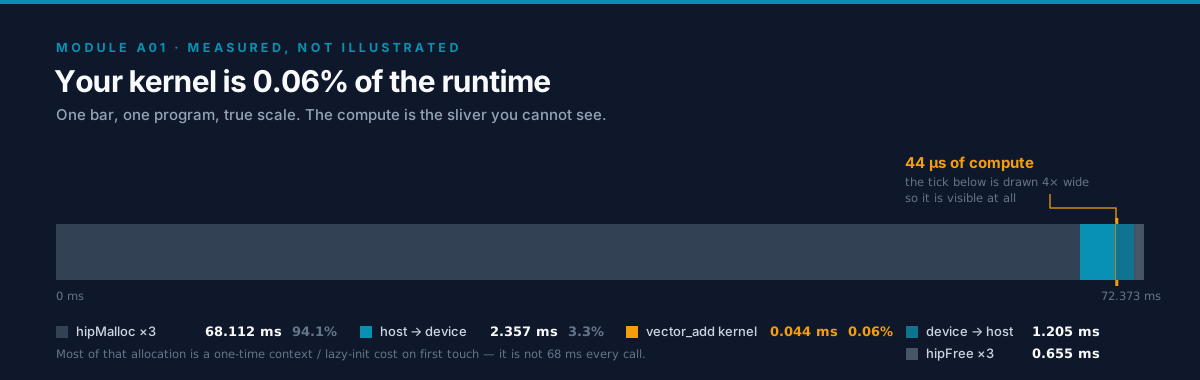
That bar is the module in one image, at true scale, from the rocprofv3 run in Lab 4. You cannot see
the kernel — and that is the finding, not a drawing problem.
The right question for any kernel is: am I limited by compute or by memory? Vector add tells you immediately.
The arithmetic-intensity argument¶
Vector add does, per element: read 8 bytes (A[i], B[i]), one add (1 FLOP), write 4 bytes
(C[i]). That's 1 FLOP per 12 bytes, an
arithmetic intensity of ~0.083 FLOP/byte. A
data-center GPU delivers on the order of hundreds of TFLOP/s of compute but only a few TB/s
of memory bandwidth. The crossover (the
roofline "ridge point") sits far to the
right of 0.083. So vector add is
hopelessly memory-bound —
its speed is decided entirely by bandwidth, and no amount of faster math helps.
%%{init: {'theme': 'base', 'themeVariables': {'primaryColor': '#F8FAFC', 'primaryBorderColor': '#0891B2', 'lineColor': '#64748B'}}}%%
flowchart LR
  subgraph roof["Roofline intuition"]
    MB["Memory-bound<br/>vector add<br/>~0.08 FLOP/byte"]
    CB["Compute-bound<br/>dense matmul<br/>high FLOP/byte"]
  end

  MB -->|"limited by HBM TB/s"| BW["Bandwidth ceiling"]
  CB -->|"limited by TFLOP/s"| COMP["Compute ceiling"]

  classDef warn fill:#FEF3C7,stroke:#F59E0B,color:#0F172A
  classDef trackB fill:#6366F1,stroke:#0F172A,color:#fff
  class MB warn
  class CB,BW,COMP trackB
Vector add sits far left on the roofline — formal treatment in Track B02, which turns this back-of-envelope into a number and a ceiling you can plot against.
The kernel's effective bandwidth is:
effective_GBps = total_bytes_moved / kernel_time_seconds
             = (3 * N * sizeof(float)) / time      # 2 reads + 1 write per element
The vector_add program prints exactly this. Compare it to your GPU's peak (from rocminfo /
nvidia-smi, or the datasheet — e.g. MI300X ≈ 5.3 TB/s, H100 ≈ 3.35 TB/s HBM3). If you're getting a
healthy fraction of peak on the coalesced pattern, the kernel is doing about as well as it can.
Representative shape of results¶
(Actual numbers depend on your GPU and N; run the labs to get yours. The pattern is the lesson.)
| Kernel | Access pattern | Effective BW | Verdict |
|---|---|---|---|
vector_add |
coalesced | large fraction of peak HBM | memory-bound, near-optimal |
coalescing (stride 1) |
coalesced | ~same as above | baseline |
coalescing (stride 32) |
strided | a fraction of the above | wasted bandwidth |
Optimization delta to internalize: switching from strided to coalesced access — zero change to the math — is often a multiple-x speedup. Memory access pattern, not FLOPs, is the first lever for memory-bound kernels; A02 §5 measures that lever end to end on a transpose.
6. Challenges, Drawbacks & Tradeoffs¶
%%{init: {'theme': 'base', 'themeVariables': {'primaryColor': '#F8FAFC', 'primaryBorderColor': '#0891B2', 'lineColor': '#64748B'}}}%%
flowchart TD
  BUG{"Something wrong?"}
  BUG -->|garbage output| E1["Check HIP_CHECK / CUDA_CHECK"]
  BUG -->|silent corruption| E2["Add if idx less than n"]
  BUG -->|time reads zero| E3["Use GPU events or sync"]
  BUG -->|slow end-to-end| E4["Profile PCIe vs kernel"]
  BUG -->|crash only at large N| E5["Check size_t overflow in byte math"]

  E1 --> FIX1["Fix at failing API call"]
  E2 --> FIX2["Guard partial last block"]
  E3 --> FIX3["Record events around kernel"]
  E4 --> FIX4["Keep data on device / fuse / streams"]
  E5 --> FIX5["static_cast size_t before multiply"]

  classDef warn fill:#FEF3C7,stroke:#F59E0B,color:#0F172A
  classDef success fill:#10B981,stroke:#0F172A,color:#fff
  class BUG warn
  class E1,E2,E3,E4,E5 warn
  class FIX1,FIX2,FIX3,FIX4,FIX5 success
Pitfall 1 — Ignoring errors (the legacy code's real bug)¶
The repo's original 02.vector_add assigns hip_error = hipMalloc(...) and then never checks the
value. If the allocation or copy fails, the program sails on and produces garbage or crashes far
from the real cause. GPU launch errors are worse: a kernel launch is asynchronous, so the error
surfaces later, at the next synchronizing call — not at the launch line. Always wrap runtime
calls and check launch errors explicitly:
HIP_CHECK(hipMalloc(&d_A, bytes));
kernel<<<grid, block>>>(...);
HIP_CHECK(hipGetLastError());        // catches launch-config errors (e.g. too many threads)
HIP_CHECK(hipDeviceSynchronize());   // catches errors during execution
This module's hip/check.h and cuda/check.cuh provide these macros. Using them is not optional
style — it is the difference between a 2-minute fix and a 2-hour debugging session.
Pitfall 2 — The missing bounds check¶
Covered in §3: without if (idx < n), the last partial block writes out of bounds. Silent memory
corruption. Always guard.
Pitfall 3 — Timing an async launch¶
kernel<<<...>>>() returns immediately, before the GPU finishes. If you read a CPU timer right
after the launch, you time nothing. Use GPU events (hipEventRecord/cudaEventRecord) around
the kernel, or a hipDeviceSynchronize() before stopping a CPU timer. The vector_add program uses
events, the correct approach.
Pitfall 4 — PCIe is the hidden bottleneck¶
For this tiny workload, copying A and B to the device and C back over
PCIe (tens of GB/s) usually costs
more than the kernel (HBM at TB/s + trivial math). The lesson generalizes: data
movement, not computation, dominates many real workloads. The fixes you'll meet later — keeping
data resident on the GPU, fusing kernels (A07),
overlapping copy with compute via streams — all attack this. For now, just see it in the profiler
(Lab 4).
Pitfall 5 — Integer overflow in byte-size math¶
Every allocation computes count * sizeof(T). The habit in this module's code is to widen the
count to size_t before the multiply (see vector_add.cpp line 28). The reference note below
explains exactly when this stops being style and starts being a real, silent bug.
[!NOTE]
📐 Reference —
static_cast<size_t>and overflow-safe size math¶Claim.
const size_t bytes = static_cast<size_t>(n) * sizeof(float);— the cast is a load-bearing habit, not decoration. It keeps the multiplication in 64-bit unsigned space so a large element count cannot overflow before it is widened.Platform integer widths (why the bug is platform-dependent):
Platform intsize_tData model Windows x64 (MSVC) 32-bit 64-bit LLP64 Linux x64 (GCC/Clang) 32-bit 64-bit LP64 macOS arm64 / x64 32-bit 64-bit LP64 32-bit x86 (legacy) 32-bit 32-bit ILP32 On every 64-bit desktop/server target,
intis 32-bit signed (max2,147,483,647) whilesize_tis 64-bit unsigned. That width gap is the trap.Worked example — the bug fires at
n = 1 << 30:int n = 1 << 30; // 1,073,741,824 elements (~1G floats) int bytes = n * sizeof(float); // int math: 1,073,741,824 * 4 = 4,294,967,296 = 2^32 // > INT_MAX -> signed overflow (undefined behavior) // Typical outcome: `bytes` wraps to 0 (or negative). hipMalloc(&p, 0) "succeeds", // then the first kernel access corrupts memory or segfaults far from the real cause.The fix — widen first:
size_t bytes = static_cast<size_t>(n) * sizeof(float);
// 1,073,741,824 * 4 = 4,294,967,296  ->  fits in 64-bit size_t. Correct.
Two-dimensional trap (image / tensor flattening): casting only at the end is too late — the intermediate product already overflowed:
int  n     = width * height;                                  // 50000*50000 overflows int FIRST
size_t bad = static_cast<size_t>(n) * sizeof(float);          // garbage in, garbage out
size_t ok  = static_cast<size_t>(width) * height * sizeof(float); // widen BEFORE the product
When does line 28 actually need the cast?
nn * 4bytesFits in 32-bit int?1 << 24(this module, ~16.7M)~64 MiB ✅ yes — safe today 1 << 28(~268M)~1 GiB ✅ yes (1,073,741,824) 1 << 30(~1.07G)~4 GiB ❌ overflows width * height, large dims> 2 GiB ❌ overflows Rule of thumb. Any
count * sizeof(T)(orw * h * c * sizeof(T)): cast the counts tosize_tbefore multiplying, keep the whole chain insize_t/uint64_t, and never store a byte count inint. Cost of the habit: zero. Cost of skipping it: a silent heap corruption at scale.See also: cppreference
static_cast· fixed-width &size_t· data models LP64/LLP64/ILP32.
Tradeoffs to hold in mind¶
- Block size: too small underutilizes the SM/CU; too large can hurt occupancy via register pressure. 128–256 is a safe default; A03 §3 shows how to tune it.
- Portability vs native: HIP buys you AMD+NVIDIA from one source, at the cost of occasionally trailing the very latest CUDA-only features. Triton buys you both vendors and far less code, at the cost of less control than hand-written C++.
- When not to use a GPU at all: tiny data (the copy overhead dominates), heavily branchy / pointer-chasing / inherently serial logic, or latency-critical single requests. GPUs win on throughput over large, regular data.
7. Real-World Use Cases¶
- Elementwise tensor ops in every deep-learning framework (add, scale, activation, dropout) are
exactly this vector-add pattern, just fused and typed. When PyTorch runs
a + bon CUDA/ROCm, it launches a kernel shaped like Lab 2. - Coalescing (Lab 3) is why frameworks store tensors in contiguous, aligned layouts and why a transpose or a bad stride can tank performance — the same lesson at production scale, and the whole subject of A02.
- The host/device dance and PCIe cost motivate
pin_memory,non_blocking=Truetransfers, and keeping activations on-device throughout training — standard practice in real pipelines. - The async-launch model is the foundation of overlapping data loading with compute, the bread and butter of high-throughput training and inference loops.
Libraries embodying this module's ideas: PyTorch/JAX elementwise ops, Thrust/rocThrust, CUB/hipCUB, and every custom Triton elementwise kernel you'll write in A08.
Where to go next. A02 takes Lab 3's stride measurement apart and hands you the tools to fix it rather than only observe it — cache-line transactions, shared memory, and bank conflicts. A03 expands §3's one-paragraph occupancy sketch into the arithmetic that decides your block size and how much latency the scheduler can hide. B02 makes §5's "hopelessly memory-bound" a number you can compute before writing a kernel, instead of a verdict you reach after profiling one.
8. Cited References¶
Grounding for the claims above. Every source this module leans on is shared with other modules, so each is cited by anchor into the master bibliography, where the URL and its retrieval date live.
- CUDA C++ Programming Guide — programming model, execution model, memory model. The normative definition of the grid/block/thread hierarchy that §2 derives from the problem and §3 maps onto silicon.
- CUDA C++ Best Practices Guide — coalescing, occupancy, async transfers, timing with events. The vendor rules behind Lab 3's stride sweep and Lab 2's event-based timing.
- HIP Programming Model — HIP
grid/block/thread model,
hipLaunchKernelGGL. The source for §3's CUDA-to-HIP correspondence table and the AMD spelling everyhip/sample uses. - AMD CDNA architecture — CU, wavefront (64), LDS, HBM bandwidth. Where §3's 64-lane wavefront — the one AMD-vs-NVIDIA difference this module insists on — comes from.
- Roofline (Williams, Waterman and Patterson, 2009) — the compute-vs-memory bound framing used in §5, and the ridge point that puts vector add's 0.083 FLOP/byte firmly on the bandwidth side of it.
- Triton tutorials
— the vector-add kernel structure in
triton/vector_add.py.
9. Self-Assessment & Interview Drills¶
Conceptual (answers below)¶
- A kernel is launched with
blockDim.x = 256andN = 1000. How many blocks do you launch, and how many threads haveidx >= N? Why does that matter? - You launch a kernel and immediately read a CPU clock to time it. What's wrong, and how do you fix it?
- Your teammate's kernel "works on my 32-lane NVIDIA GPU" but produces subtly wrong results on an AMD GPU. Name one warp/wavefront-size assumption that could cause this.
- Explain to a non-programmer, in two sentences, why a GPU can be slower than a CPU for adding two 10-element arrays.
Answers
ceil(1000/256) = 4blocks → 1024 threads, so 24 threads haveidx >= N. Withoutif (idx < n)those 24 write out of bounds — silent corruption.- The launch is asynchronous; the CPU clock captures ~0 work. Fix: use GPU events around the
kernel, or
hipDeviceSynchronize()/cudaDeviceSynchronize()before stopping a CPU timer. - Any code that hard-codes 32 (e.g. a manual warp reduction using
__shflover 32 lanes, or assuming a block of 32 is exactly one lockstep bundle) breaks on a 64-lane wavefront. Portable code queries the warp/wavefront size or uses block sizes that are multiples of 64. - The GPU has to first ship the numbers across a slow bridge to its own memory and back, and it's built to win when there are millions of numbers, not ten — the setup costs more than the work.
Coding & Algorithms drills¶
Do these in exercises/; reference answers in solutions/. Write real,
compiling, edge-case-correct code — no pseudo-code. Each drill's expected terminal output (PASS and
the instructive FAIL states) is captured in
exercises/README.md → Sample sandbox output.
- SAXPY (
exercises/01_saxpy.cpp) — implementY[i] = a * X[i] + Y[i]as a kernel, with the bounds guard, full error checking, and a CPU verification. This is the "hello world" of BLAS. - Fix the race (
exercises/02_race_condition.cpp) — a histogram kernel increments shared counters withbins[v]++and gets wrong totals. Diagnose the data race and fix it correctly (hint: atomics). Prove the fix with a CPU reference count. - Occupancy whiteboard (
exercises/03_occupancy.md) — given registers/thread, threads/block, and the SM/CU limits, compute how many blocks are resident and the resulting occupancy; then say which resource is the limiter and one way to raise occupancy.
Stretch¶
- Port
vector_addto Triton yourself and match the C++ effective bandwidth. - Modify
coalescingto sweep strides{1,2,4,8,16,32}and plot BW vs stride. Explain the shape using the warp/wavefront transaction size.